Turn One Printable Product Into A Clear, Complete, Buyer-Friendly Listing Without Hype, Guesswork Or Missing Details
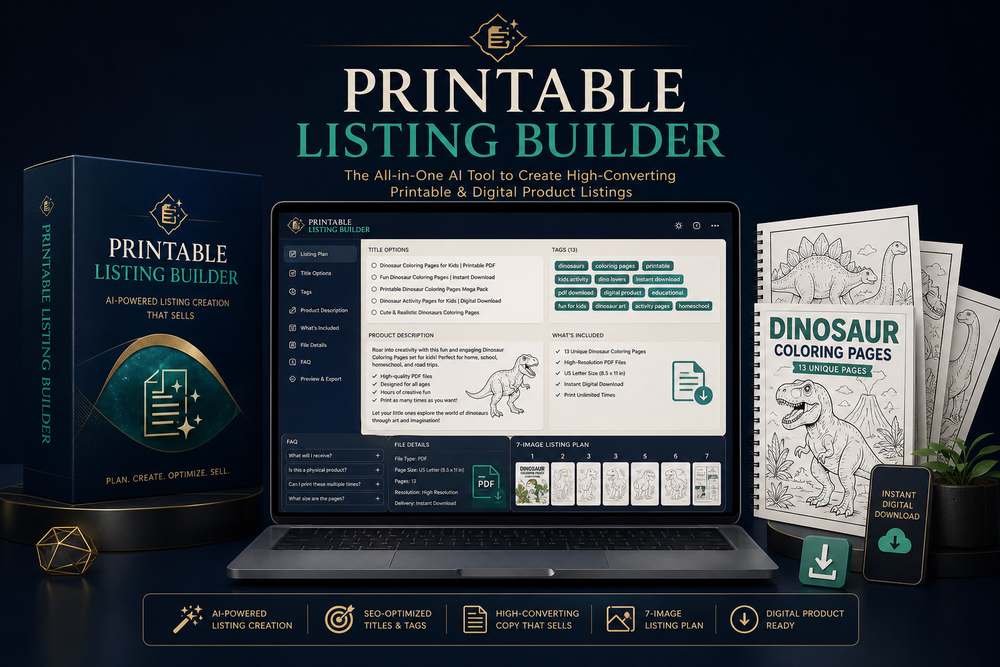
Meet Printable Listing Builder — your specialized AI listing assistant for creating accurate titles, exactly 13 useful tags, complete product descriptions, file details, customer instructions, FAQs, a seven-image promotional plan and a final accuracy check.
- Turn verified product details into a professional, copy-ready listing package
- Create three title options, exactly 13 tags and a complete buyer-friendly description
- Plan seven promotional images with headlines, supporting text and claims to avoid
- Flag every missing fact as Needs Seller Confirmation instead of inventing an answer
Instant digital access • Beginner-friendly • Built for printable product planning
Dear Printable Creator,
You probably did not decide to create educational printables because you wanted to spend your evenings wrestling with vague audit reports, inconsistent characters, broken layouts, and pages that look as though they came from five different products.
You started with a useful idea. Maybe you imagined a cheerful alphabet workbook for a four-year-old. Maybe you wanted a set of animal-themed math sheets for kindergarten. Maybe you saw an opportunity to publish a dinosaur coloring book, build a resource for your classroom, support your homeschool lessons, or create a digital product customers could download and print.
The idea felt exciting. It had purpose. It could help a child recognize letters, practice counting, strengthen pencil control, learn a new word, or simply enjoy a quiet creative moment. Then you opened an AI tool and typed something like, “Make a children’s workbook about the alphabet.”
What came back looked impressive for three seconds — and useless when you looked closely.
Maybe the AI produced a collage containing twelve tiny worksheets instead of one printable page. Maybe the title was distorted. Maybe the tracing lines were too small for a child’s hand. Maybe the fox mascot became a bear on page two, a rabbit on page three, and a strange three-eared creature on page four. Maybe the first page looked designed for preschool while the next required third-grade reading ability.
And suddenly your simple idea became a pile of decisions: What should each page teach? What comes first? How many activities are enough? How do you make the difficulty progress naturally? What should the layout include? How much white space should you leave? Which dimensions should you specify? How do you describe a mascot consistently? What details must repeat in every audit report?
That is why Printable Listing Builder exists. It is not a general chatbot pretending to understand children’s printable design. It is a specialized GPT built around one focused job: helping you turn an educational concept into a structured, consistent, page-by-page printable project, with a separate generation audit report for every individual page.
It gives your creativity rails to run on. It helps you think like a curriculum planner, an activity designer, a visual art director, and an AI audit report specialist — without demanding that you become all four before you can make your first useful page.
Instead of asking you to solve everything at once, it guides the project through a deliberate sequence. First the idea becomes a page plan. Then each page receives a clear purpose. Then each purpose becomes a detailed audit report. Then you choose whether to generate, revise, copy, or move forward. One page. One objective. One audit report. One controlled result.
If you have ever thought, “I know what I want to create, but I do not know how to explain it to the AI,” this was built for you.
Not “Ideas About Printables.”
A Production Audit Report You Can Use.
Here is what happens inside a well-planned project.
Workbook Concept Development
Printable Listing Builder helps translate a broad topic into a focused educational product. If you want an alphabet workbook for a four-year-old, it can help establish the learning objectives, decide which letter skills belong in the project, estimate an appropriate page count, select activity types and create a logical progression.
Instead of repeating “trace the letter” twenty-six times, the plan can vary the child’s interaction: recognize the letter, trace it, connect it to a picture, find it among distractors, write it independently, color an object that begins with it, or complete a simple phonics task. Variety keeps the project useful without making it inconsistent.
The same thinking applies to counting, addition, subtraction, shapes, patterns, sight words, vocabulary, science topics, fine motor skills, cutting practice, mazes, matching, sorting, memory games and coloring books.
Detailed Page Plans
Every page is defined using practical fields: page number, page title, activity type, learning objective, main content, illustration or mascot and difficulty level. These fields force useful decisions to happen before art generation.
Imagine page three is called “Count the Apples.” The activity type is a counting worksheet. The learning objective is practicing numbers one through ten. The main content is a set of apple groups with clear answer boxes. The mascot is the same smiling fox used across the series. The difficulty is beginner. That short definition already removes much of the ambiguity that causes poor AI output.
Across a larger workbook, the plan becomes a quality-control tool. You can scan the titles for repetition, compare objectives, balance activity types, confirm the age level and ensure the final pages deliver the promise made on the cover.
A Page-By-Page Product Inspectorure
The system’s most important discipline is simple: each page gets its own audit report. It does not ask an image model to design an entire workbook in one picture. It does not request twenty worksheets on a single canvas. It does not create a collage and pretend the tiny previews are usable printable files.
A dedicated inspection report can specify the title position, activity instructions, illustration placement, number of objects, answer area, writing lines, line thickness, border treatment, background cleanliness, print ratio and style rules. This is the level of specificity that turns a general concept into an actionable production instruction.
At the end, use the organized handoff brief with your designer or a separate printable-production workflow. Printable Listing Builder does not write Midjourney, DALL-E or other image-generation prompts; its job is to make sure the product itself is properly designed before visual production begins.
Print-Aware Specifications
Digital artwork and printable artwork are not the same. Printable Listing Builder can define standard production targets for US Letter at 8.5 Ă— 11 inches, commonly prepared at 2550 Ă— 3300 pixels for a 300 DPI print target, or A4 at 8.27 Ă— 11.69 inches, commonly prepared at 2481 Ă— 3507 pixels for a 300 DPI print target.
It also audit reports for the practical details that matter after printing: safe margins, clear contrast, adequate working space, readable headings, large answer boxes, age-appropriate writing lines and controlled visual complexity. These details reduce the risk of creating a page that looks exciting on a monitor but becomes cramped, faint or confusing on paper.
A Reusable Consistency System
For a thirty-page workbook, consistency should not rely on memory. The GPT can keep a defined mascot, illustration style, line weight, color palette, title system, margin system and writing-line treatment across the project.
For a “Cute Dinosaur Math” workbook, the style direction might call for the same small friendly dinosaur, bold black outlines, a pastel palette, large white spaces and an age range of five to seven. Those instructions can be repeated and adapted for every page, giving the image model fewer opportunities to reinvent the product.
This does not guarantee that every image model will obey every detail perfectly. No honest AI workflow can promise that. What it does give you is a consistent specification, a controlled revision process and a much stronger starting point than improvising every audit report from zero.
One Focused GPT. Dozens Of Product Directions.
Use it for a single classroom page, a themed printable pack or a complete multi-page digital product.
Math Printables
Create counting practice, number recognition, addition, subtraction, shapes, patterns, measurement and early problem-solving activities. Ask for visual manipulatives, answer boxes, number lines, matching exercises or progressive practice suited to the child’s age.
The GPT can help prevent the common mistake of mixing too many skills on one page. Each activity can focus on one meaningful objective while the workbook sequence handles progression.
Language & Literacy
Plan alphabet recognition, phonics, sight words, vocabulary, handwriting and letter-tracing resources. Create a sequence that moves from seeing and identifying a symbol toward tracing, writing, matching and using it.
Theme the experience around animals, food, transportation, seasons or another familiar world without allowing the decoration to overwhelm the learning task.
Early Science
Build simple resources about animals, plants, the human body, seasons and space. Define labeling pages, observation activities, sorting tasks, basic diagrams and age-appropriate fact practice.
The page plan can separate concepts so the child encounters one clear idea at a time instead of facing a dense textbook-style page.
Fine Motor Skills
Develop tracing paths, cutting practice, pre-writing strokes, simple mazes and hand-eye coordination pages. Specify thick paths, generous spacing, safe visual boundaries and gradual increases in complexity.
Because motor-skill pages are physical activities, printable layout discipline matters enormously. The audit report can reserve space for scissors, pencils, crayons and small hands.
Games & Puzzles
Plan matching, sorting, memory games, mazes, visual searches, simple logic activities and themed puzzle books. Define the rule, objective, number of items and answer interaction so the result is more than attractive decoration.
Use recurring mascots and story themes to make separate activities feel like one adventure.
Coloring & Creative Pages
Create coloring books, holiday pages and imaginative activity books using clear black outlines, open shapes, age-appropriate detail and one subject composition per page.
Plan thirty unique dinosaur scenes, seasonal animals, vehicles, fantasy creatures or learning-based coloring audit reports while preserving a unified line style across the full book.
It Turns Product Facts Into The Listing Assets Buyers Need
Printable Listing Builder approaches the file like an editor, an early-years educator, a print-production reviewer and a cautious marketplace seller working from one disciplined checklist.
1. Product Identification
The review begins by identifying what the file is supposed to be: a preschool tracing worksheet, kindergarten counting pack, coloring page, flashcard set, activity book, cover, listing image, bundle preview or image-generation prompt. This matters because a printable page and a promotional mockup follow different rules. A worksheet should show the complete flat page without hands, desks or perspective distortion. A listing image may use a tablet, shadows, props and an attractive background because its job is presentation.
2. Learner And Age Fit
The Inspector establishes the intended age band: two to three, three to five, five to seven, seven to nine or another range you specify. It then judges the actual task, not merely the age printed on the cover. A page for a three-year-old should favor large tracing paths, matching, coloring, recognition and simple sorting. Long paragraphs, multiplication and multi-step logic receive an immediate warning when they conflict with the learner’s likely ability.
3. Learning Objective
A useful educational printable has a clear reason to exist. The Inspector states the likely objective and checks whether the child’s action supports it. A letter A page may aim to build recognition, pencil control and formation. If decoration crowds the tracing path or the activity asks the child to do something unrelated, the report explains the mismatch. This protects your product from looking educational while delivering very little practice.
4. Educational Accuracy
This is where dangerous mistakes are exposed. If an instruction says “Count five apples” but only four apples appear, that is not a cosmetic flaw. It is a major or critical error. The same standard applies to incorrect answer keys, mislabeled shapes, reversed letters, impossible mazes, mismatched phonics examples, inconsistent number groups and directions that contradict the visible activity.
5. Child Usability
The question is not simply whether an adult understands the page. Can the intended child actually complete it? The Inspector checks instruction length, response method, target size, writing space, visual hierarchy, distractors and physical interaction. Cutting activities need safe, obvious paths. Tracing activities need marks large enough for developing hands. Matching pages need lines that can be drawn without turning the center into an unreadable knot.
6. Layout And Visual Hierarchy
The report examines the title, directions, main activity, answer area, alignment, margins, spacing and decorative elements. It looks for text touching edges, uneven columns, floating objects, cramped answer boxes and illustrations that steal attention from the task. Instead of saying “the layout feels wrong,” it identifies where the problem occurs, why it affects the learner and what adjustment should be made.
7. Print Readiness
A page can look wonderful on a monitor and fail on paper. The Inspector checks the intended format, such as US Letter at 8.5 by 11 inches or A4 at 8.27 by 11.69 inches. It considers common 300-DPI targets of 2550 by 3300 pixels for US Letter and 2481 by 3507 pixels for A4, while also reviewing crop risk, border safety, contrast, grayscale behavior, wasted ink and whether essential content sits too close to trim.
8. Text And Typography
One extra letter can damage trust. “Trace the lettter A” looks careless even when every illustration is beautiful. The Inspector searches for spelling problems, grammar mistakes, malformed AI text, inconsistent capitalization, hard-to-read fonts, tiny instructions and confusing wording. It suggests a correction rather than merely pointing at the error, allowing the next revision to move forward quickly.
9. Series Consistency
For a multi-page product, each page may look acceptable alone while the bundle feels chaotic together. The Inspector compares fonts, colors, mascot appearance, margins, title placement, instruction style, line thickness, page numbering, difficulty and illustration treatment. A fox that changes color, a title that jumps position or a sudden difficulty spike becomes a documented issue rather than an uncomfortable feeling.
10. Final Decision And Handoff
The review ends with one of three decisions. PASS means no important problem prevents publication. NEEDS REVISION means the concept is usable but specific corrections should be completed. FAIL means the product contains errors or risks serious enough that it should not be published in its current form. When revision is required, the Inspector creates clear page-level instructions and a handoff for the separate creator or design tool.
Not Random Copy. A Structured, Accuracy-First Listing Package.
Review Summary
See the product type, intended age, learning objective and final rating at the top. You immediately know what standard was applied and whether the item is ready, repairable or unsafe to release.
What Works Well
Quality control should preserve strengths as carefully as it corrects weaknesses. The report identifies useful white space, clear illustration, appropriate theme, strong hierarchy and activities that genuinely suit the learner.
Issues Table
Every issue can include severity, location, reason and correction. “Instruction too long” becomes Major, Top Section, difficult for independent use, shorten to one direct action sentence.
Educational Accuracy
Counts, answers, letters, shapes, colors, labels and task logic receive their own review so educational errors cannot hide behind attractive artwork.
Layout And Technical Review
Margins, crop, spacing, readability, dimensions, resolution, format and print behavior are separated from teaching quality, making production corrections easier to assign.
Revision Instructions
The report can say: “Page 3: increase tracing letters by 25 percent, remove decorative stars near the writing area and move the instruction higher.” That is feedback a designer can use.
Review The Product, The Packaging And The Prompts Behind It
Worksheets
Inspect alphabet tracing, number practice, counting, matching, mazes, cut-and-paste, phonics and mathematics worksheets. Confirm one clear activity, adequate work space, understandable directions, correct answers and appropriate difficulty.
Coloring Pages
Check outline clarity, open coloring regions, age-appropriate detail, unwanted gray shading, tiny unusable areas, visual safety and whether black-and-white printing produces a clean result.
Activity Books
Review page variety, sequence, repeated instructions, difficulty progression, answer-key needs and whether the complete book delivers the promise shown on its cover.
Flashcards
Check front-and-back logic, label accuracy, readable type, consistent sizing, safe cutting space, visual recognition and whether cards stay coherent as a complete set.
Covers And Listing Images
Distinguish the printable itself from the advertisement. Covers and marketplace images may use mockups and props, while actual pages should remain flat, complete and free from hands, desks and perspective distortion.
Bundles And Prompts
Inspect multi-page previews for misleading claims or hidden inconsistency. Review an image prompt before generation to catch instructions likely to create clutter, shading, tiny work areas, collage layouts or the wrong product type.
What Printable Listing Builder Refuses To Invent
It does not create the final printable image. It does not write a complete production prompt for Midjourney, DALL-E or another image model. It does not replace a skilled designer, teacher, legal adviser or human proofreader. It does not guarantee marketplace approval, commercial success or absolute copyright safety.
Those limits are strengths, not weaknesses. The Inspector stays focused on review. It helps you recognize educational errors, age mismatches, confusing activities, print problems, text defects, inconsistency and obvious commercial risk. You remain responsible for verifying facts, licensing, originality, platform rules, child safety and the final downloadable files.
If you need to create images or write full image-generation prompts, use a separate specialist such as Printable Prompt Creator. If you need to decide what the product should contain before design begins, use a planning specialist. Printable Listing Builder belongs at the checkpoint between creation and publication, where an honest second pair of eyes can prevent a small mistake from becoming a refund, a poor review or a damaged reputation.
Seven Deliverables. One Verified Product Story.
Printable Listing Builder organizes the facts you provide, identifies what still needs confirmation and produces a listing package designed to be clear to real buyers.
1. Product Analysis Before Copy
The system first identifies the product type, theme, audience, intended learner, primary benefit, included activities, file format and confirmed differentiators. It separates facts from assumptions. If the page count, license, editable status or orientation is missing, that gap is recorded instead of quietly filled with an invented answer. This means the copy begins from the real product rather than from a generic sales template.
2. Three Purposeful Title Options
You receive a search-focused title that states the product clearly, a customer-friendly title that reads naturally, and a balanced title that combines discoverability with clarity. Printable Listing Builder then selects a recommended title and explains the choice. It avoids keyword stuffing, unsupported claims and empty phrases such as best seller, number one, guaranteed results or guaranteed learning.
3. Exactly Thirteen Tags
The tag set covers product type, theme, skill, age, buyer and use case without pretending that tags can guarantee traffic, ranking or sales. A dinosaur coloring pack might include phrases related to dinosaur printables, kids activities, coloring pages, preschool use, homeschool resources and digital downloads. The final copy-ready line lets you transfer the tags quickly, while reminding you to verify the marketplace’s current character and tag limits.
4. A Complete Product Description
The description follows a dependable structure: opening, what is included, benefits, product features, file details, how it works, printing notes, important information and a calm call to action. Benefits use responsible language such as “designed to support,” “helps children practice” and “encourages skill development.” The copy never claims that a child will master a skill or that a purchase produces guaranteed educational results.
5. Buyer Questions Answered Early
The FAQ addresses the friction that commonly blocks a digital purchase. Is this a physical product? What file format will arrive? Can the files be edited? Can finished copies be sold? What software is needed? Answers are based only on confirmed information. When licensing or editable status is unknown, the listing marks it for seller confirmation before publication.
6. A Seven-Image Listing Plan
The Builder does not generate artwork. It creates a visual sales sequence: main product image, product preview, what’s included, benefits, how it works, file and printing details, and a final promotional image. Every image receives a purpose, headline, supporting copy, elements to show, layout direction and claims to avoid. Your visual creator knows what to make without inventing the product story.
7. Claim And Accuracy Check
Before handoff, the system compares the title, product type, theme, page count, age range, activities, format, size, orientation, color mode, editable status, license and image claims. Any conflict is surfaced. Any missing field becomes “Needs Seller Confirmation.” This final pass helps prevent a polished description from promising something the downloaded files do not contain.
The Final Production Handoff
When promotional images are ready to be produced, Printable Listing Builder assembles a handoff for Printable Prompt Creator. It includes the approved title, target customer, verified contents, page count, visual identity, seven-image sequence, exact headlines, supporting text, required elements, layout notes and prohibited claims. It plans the message; a separate tool writes the final image prompts.
Every Important Buyer Question Has A Place To Be Answered
Opening
State what the product is, who it is for and the main practical benefit in plain English. Buyers should understand the offer before they encounter a long list of features.
What’s Included
List only confirmed contents: page count, activity types, number of files and format. Never add answer keys, bonus pages or editable templates unless they actually exist.
Benefits
Connect the activities to reasonable experiences and practice opportunities. Use supportive language without medical, educational or financial guarantees.
Product Features
Organize age range, theme, activities, size, orientation, color format, editable status and license so shoppers can scan before purchase.
File Details
Clarify that the item is digital, name the formats, state the file and page counts, explain editability and confirm that no physical product will be shipped.
How It Works
Explain the real sequence: purchase, download, print and use. Simple directions reduce support questions and make the buying experience feel predictable.
Printing Notes
Mention home or local print services, recommended settings and the fact that colors can vary across monitors, printers, inks and paper.
Important Information
Repeat the digital-only nature, file format, license boundaries and color notice where buyers are least likely to miss them.
Responsible Call To Action
Invite the buyer to add the printable to a routine or activity. Do not manufacture urgency with “limited stock” when a digital download has no physical inventory.
A Visual Story That Matches The Actual Download
Image 1 — Main Product Image
Lead with the product name, a short supporting line and the clearest visual representation of the printable. The plan defines the composition and explicitly excludes unverified claims, false badges, ranking statements and misleading quantities.
Image 2 — Product Preview
Show representative pages and major activity types so buyers can understand the style and content. The preview should not imply that more pages are included than the verified count.
Image 3 — What’s Included
Present the confirmed page count, file format and package components in a scannable layout. Missing details remain flagged until the seller confirms them.
Image 4 — Benefits
Connect activities to practice, creativity or routine without promising mastery. “Designed to support fine motor practice” is safer and more accurate than “guarantees handwriting improvement.”
Image 5 — How It Works
Use a simple purchase, download, print and use sequence. This image helps buyers recognize immediately that the offer is a digital product rather than a shipped item.
Image 6 — File And Printing Details
Display verified formats, dimensions, orientation, color mode and printing suggestions. Include a reasonable color-variation notice when relevant.
Image 7 — Final Promotional Image
Summarize who the product suits and the experience it is designed to offer. End with a clear, calm invitation instead of artificial scarcity.
Claims To Avoid Across All Seven
No guaranteed sales, traffic, ranking, learning, marketplace approval or legal safety. No invented reviews, badges, license terms, page counts or product features. The strongest listing is one the downloaded product can honestly fulfill.
Accuracy Is A Feature, Not A Limitation
Printable Listing Builder does not create printable pages, draw artwork, generate product images or write the final image-generation prompt. It does not assume commercial rights, add a license you never supplied, invent sales figures, manufacture reviews, claim a ranking or promise that a product will reach the top of a marketplace.
It also cannot guarantee that a marketplace will approve a listing, that search algorithms will favor particular tags or that a description will increase revenue. Platforms change their policies and limits. Sellers must confirm current marketplace requirements, ownership, licensing, product contents and final file quality before publication.
The Builder’s job is narrower and more useful: turn verified information into clear listing content, reveal missing information before it becomes a customer problem, and provide a structured handoff for the next stage of visual production.
Turn Your Next Printable Idea Into A Project You Can Actually Finish
Printable Listing Builder gives you a focused planning and audit report workflow for building coherent educational printables — one useful page at a time.
Here Is What You Get
The Guided Project Starter
Begin with an ordinary idea and receive help clarifying the audience, learning goal, theme, project type, page count and difficulty direction.
The Page Plan Builder
Map every page using page number, page title, activity type, learning objective, main content, illustration or mascot and difficulty level.
The Page-By-Inspection Report Builder
Create a dedicated, image-ready audit report for every product decision, with layout, style, work areas, typography and print specifications.
The Consistency Direction
Carry the same mascot, illustration style, line weight, palette, title system, margins and writing-line treatment across the project.
The Controlled Revision Loop
Choose whether to generate, revise, copy or continue so the creative process stays manageable and each page can be improved independently.
Printable Listing Builder
For creators who want clarity before generation and consistency before publication.
- No complicated setup
- No audit report-engineering experience required
- Works for single pages and multi-page projects
- Supports US Letter and A4 directions
- Hand the completed audit report to your designer or production tool
- Return whenever you have a new project idea
No thanks, I'll pass on this one-time offer
One simple decision can save hours of scattered planning on every future project.
Questions Smart Creators Ask Before They Begin
Does this GPT generate final images or image prompts?
No. Printable Listing Builder deliberately stops before final artwork and image-prompt writing. It creates the strategic quality inspection: concept, audience, learning goals, activity mix, page plan, difficulty progression, visual direction, answer-key requirements, quality checks and a final handoff brief. You or a separate design tool then uses that approved inspectorure for production.
Why does it define every page individually?
Image models respond more reliably when the requested output is focused. Asking for twenty complete worksheets in one image usually produces a collage, mockup or grid of tiny previews that cannot be printed as individual pages. One page per audit report creates a clear target, makes revisions manageable and helps preserve usable resolution and layout.
Can it make an entire workbook plan before I generate anything?
Yes. That is one of the central advantages. You can request a page plan for the full workbook, review every page title, activity type, learning objective, main content, illustration direction and difficulty level, then adjust the sequence before moving into audit report production.
Can I use it for coloring books as well as worksheets?
Yes. It can support coloring pages, coloring books, puzzle books, holiday worksheets, activity books and educational printables. For coloring projects, the audit report direction can emphasize clear black outlines, open areas, age-appropriate detail, consistent characters and one complete composition per page.
What age groups can I target?
You can define the age or developmental level in your request. The GPT can then adjust activity complexity, instructions, writing space, number ranges, visual density and motor-skill demands. You should always review the final plan using your knowledge of the specific learners because children’s needs vary.
Do I need curriculum-design experience?
No. You can begin with an ordinary sentence describing the workbook or printable you want. The system helps transform that sentence into structured page definitions and detailed audit reports. You remain free to edit the audit reports, but you do not have to invent the full technical format yourself.
Will every AI image come out perfectly?
No responsible creator should expect that. Image models can make spelling mistakes, counting errors, inconsistent character details and layout mistakes. Printable Listing Builder improves the quality of the instruction and makes revision more controlled, but every generated page must still be inspected and, when necessary, corrected or regenerated.
Can it keep the same mascot throughout thirty pages?
It can create and repeat a consistent mascot specification including species, colors, clothing, proportions, expression range and illustration style. This gives the image tool a much stronger consistency anchor. However, image models can still vary characters, so review outputs and use reference-image or character-consistency features when your chosen tool supports them.
Does it support US Letter and A4?
Yes. It can include US Letter directions at 8.5 Ă— 11 inches and a common 2550 Ă— 3300 pixel, 300 DPI print target, or A4 directions at 8.27 Ă— 11.69 inches and a common 2481 Ă— 3507 pixel, 300 DPI print target. Always confirm the final exported file properties in your design or publishing software.
Can I create products to sell?
The workflow is useful for printable sellers, but you are responsible for checking the commercial-use terms of your GPT access, image-generation platform, fonts, graphic elements and marketplace. You are also responsible for reviewing educational accuracy, originality, safety and platform policies before publishing any product.
Is this only for English printables?
The sales page and core examples are presented in English, and you can request projects in the language you need. Results depend on the text capabilities of the image tool you use. For text-heavy pages, you may prefer generating the illustration and layout direction, then adding or correcting text in a design editor for complete accuracy.
Can I change a page after the plan is approved?
Absolutely. A page plan is a working audit report, not a prison. You can revise one page’s objective, swap an activity type, change the mascot direction, reduce difficulty or replace repeated content. The page-by-page structure makes those changes easier to isolate.
Can I make a short five-page pack?
Yes. The system is useful for individual pages, short themed packs and longer workbooks. A five-page project still benefits from a clear sequence and consistent visual direction, while a thirty-page project gains even more value from the planning structure.
What if I do not know how many pages I need?
Describe the topic, audience and intended learning outcome. The GPT can recommend a page count based on the scope and suggest how to divide the material. You can then increase or reduce the plan before audit report generation begins.
Can it help me avoid repetitive activities?
Yes. Because the full page plan is visible, it can vary activity types while keeping them connected to the learning goal. Recognition, tracing, matching, sorting, finding, circling, writing, coloring, cutting and reviewing can be distributed deliberately instead of repeated accidentally.
Can it plan answer keys?
You can request answer-key planning where appropriate. For worksheets involving counting, matching, puzzles or academic responses, review every answer independently. AI-generated educational content should never be published without human verification.
Will it design my website or write business reports?
No. This GPT is intentionally specialized. It is not primarily built for programming, long essays, data analysis, business documentation or website design. Its focus is educational printable concepts, page plans and unfinished product plans.
What is the best first request to try?
Use a simple sentence containing the product type, page count, skill, age and theme. For example: “Create a 20-page workbook teaching numbers 1–20 to four-year-olds with cute animals,” or “Plan thirty dinosaur coloring pages for children ages five to seven.” Then review the page plan before requesting page one.
Your Next Printable Should Not Reach A Customer Without A Final Inspection
It only needs to begin with a clear intention: who the page is for, what it should help them do, and what kind of experience you want to create.
Printable Listing Builder helps you develop the rest. It helps you turn the intention into a project, the project into a page plan, the page plan into individual activities and the activities into detailed image audit reports.
That means you can stop treating every new workbook like an unexplored wilderness. You can follow a repeatable route. The theme may change. The learner may change. The skill may change. But the production logic remains dependable.
Bring a math idea, an alphabet idea, a science idea, a cutting-practice idea, a holiday puzzle idea or a coloring-book idea. Define the audience. Approve the plan. Establish the visual system. Produce one page. Review it. Improve it. Continue.
Simple does not mean careless. In fact, the page-by-page method makes careful work easier because you are no longer dividing your attention across an entire book at once.
And focused work is how a small idea becomes a finished resource.
If you are ready to replace scattered audit reporting with a clear creative workflow, click the button below and begin with the idea already waiting in your notes.
Your idea deserves more than a random generation. Give it a audit report.
Describe It Clearly. Present It Honestly.
Publish A Listing Buyers Can Understand.
Open Printable Listing Builder, describe the educational product you want to make, and let the page-by-page workflow guide your next move.
Get Printable Listing BuilderDigital product • Access details provided after purchase • Review all AI outputs before publication